
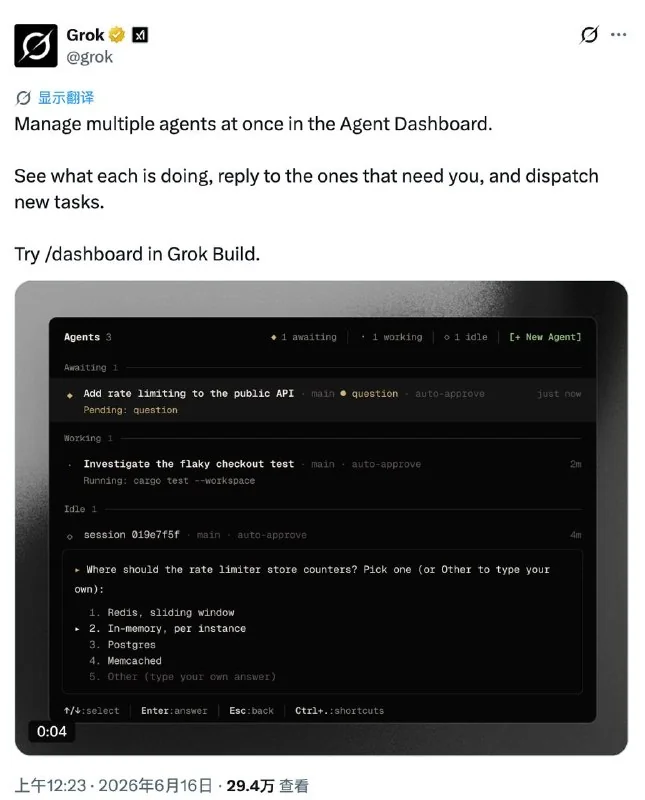
xAI has rolled out a terminal-based dashboard for its software engineering coding agent, Grok Build, called Agent Dashboard. Developers can pull it up from an existing coding session by typing the slash command /dashboard or using the shortcut Ctrl+\, or just run grok dashboard directly in the terminal.
https://twitter.com/grok/status/2066557141868257444
The dashboard uses a card-based interface inside the terminal, making it possible to monitor and manage multiple Grok Build coding sessions all in one view. It sorts sessions by status — active, idle, or waiting for input — and keeps track of how long each task has been running.
To solve the classic multi-agent blocking problem, when a sub-agent needs human confirmation or asks a question, the associated session is automatically pinned to the top. Developers can preview the sub-task's latest output and reply right from the dashboard without flipping between terminal windows. The dashboard also supports grouping tasks by working directory with Ctrl+S, and can collapse sub-agents underneath their parent task.