
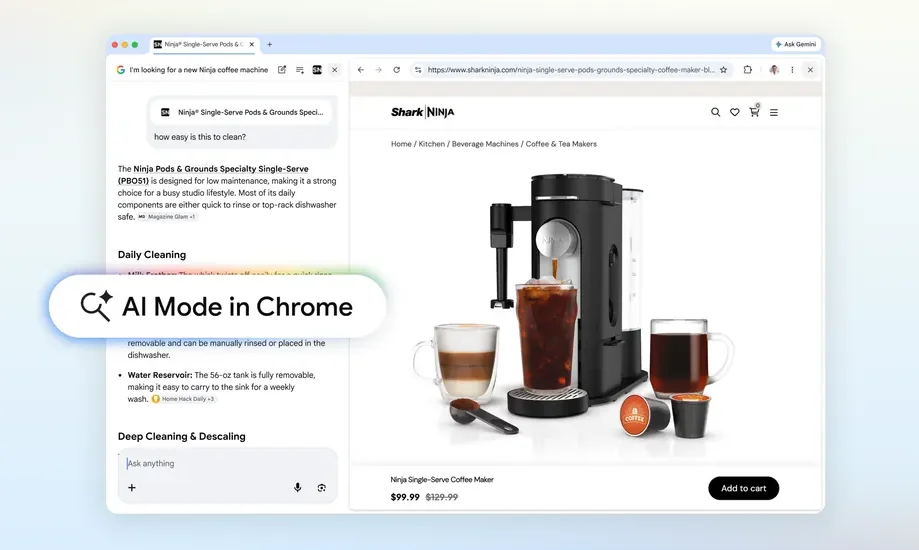
Google just gave its Chrome browser's AI Mode a significant overhaul, introducing a split-screen view that could fundamentally change how we search the web.
The most noticeable change? When you click a link in AI Mode, the webpage now opens right alongside the AI interface. No more tab-hopping. You can keep your original search context visible while browsing different sites, comparing information, and asking follow-up questions.
Here's how it works in practice: Say you're shopping for a coffee maker with specific features. You tell AI Mode what you want, and it generates a list of suitable products. Click one of those options, and the product page loads in a split-screen view with the AI tab still visible. You can then ask more specific questions like "how easy is this to clean?" and the AI will scan both the open page and the broader web to give you a comprehensive answer.
In a blog post, Google Vice Presidents of Product Robby Stein and Mike Torres said early testers appreciated that they "didn't have to constantly switch tabs to get help with a comprehensive article or long video." They also found that "having both Search and the web side-by-side helped them stay focused on their tasks while exploring useful web pages."
Searching across your open tabs
Google is expanding this functionality with another clever feature: AI Mode can now search across your open Chrome tabs. Tap the new "plus" menu in the AI Mode search box or on a new tab, and you can select which open tabs to include in a new search. You can also upload files like images and PDFs to add more context to your queries.
https://www.youtube.com/watch?v=4kia4ACwHBM
Stein and Torres offered a couple of examples. If you're researching hiking trails and already have tabs open for your top destinations, you can use the "plus" menu to ask AI Mode to find similar trails in a different location—it'll understand exactly what you're looking for. Or if you're studying for a statistics exam, you could bring context from your open tabs or class notes into a search and ask Google to find more examples illustrating a specific concept.
Google's AI push continues
These updates are part of Google's aggressive push to integrate AI into flagship products like Search and Chrome. The company introduced AI Mode in Chrome last September, effectively turning it into an "AI-native" browser. That built on the original AI Overviews feature in Google Search, which faced significant criticism early on for inconsistent answers. Google has since worked to improve the accuracy of its AI responses, and adding tabbed context should help further refine its outputs.
The updated AI Mode is launching first in the U.S., with other regions to follow soon.