OpenAI just rolled out a research preview feature called Chronicle for its Codex programming agent. Turn it on, and the macOS Codex client will ask for screen recording and accessibility permissions, then continuously capture your screen. In the background, it summarizes those screenshots into local memory files that get pulled up as context the next time you start a new session. For now, it's only available to ChatGPT Pro subscribers, and it's not launching in the EU, UK, or Switzerland.
https://twitter.com/OpenAIDevs/status/2046288243768082699
What Chronicle actually does
Chronicle targets a blind spot in Codex's existing memory system. Previously, memories could only be generated from the conversation itself. If you switched windows, checked a document, or looked at an email, none of that left a trace. Every new session meant re-explaining "what I'm working on."
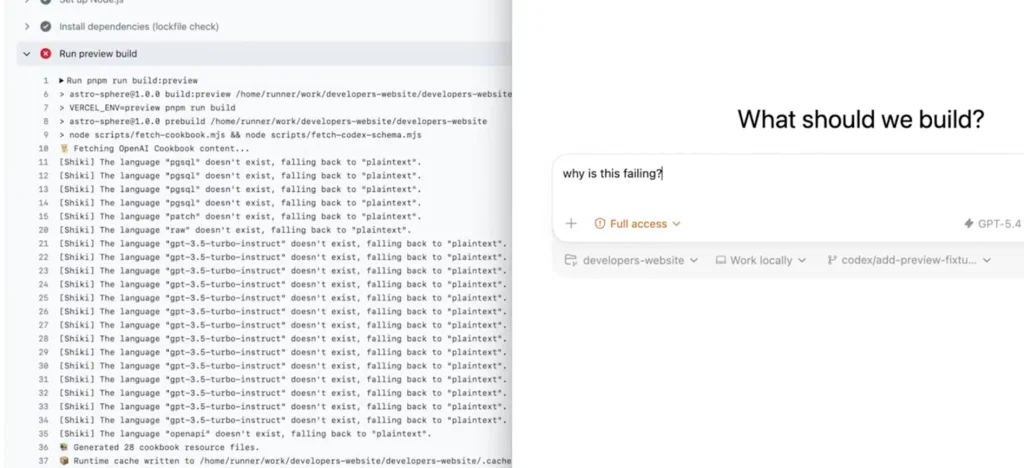
The official documentation leads with this example: a user simply types, "Why did this fail?" Codex first scans the most recent screen captures, recognizes that you're currently looking at a GitHub Actions failure log, then opens the log itself and pinpoints an unescaped > character in an MDX document.
It can also fill in vague instructions. Take something like, "Sync the latest docs draft and tell Romain on Slack." Chronicle identifies which Google Doc draft and which Romain you're referring to from recent screen activity, and Codex proceeds accordingly.
The privacy and security trade-offs
Screenshots get uploaded to OpenAI's servers to generate summaries. The company says they're not retained after processing and aren't used for training. But the generated memories are stored as unencrypted Markdown files in ~/.codex/memories_extensions/chronicle/—meaning other programs on the same machine can read them.
There's also a heightened prompt injection risk. If malicious instructions appear on your screen (say, from browsing a webpage containing agent commands), Codex might follow them. And because a background sandbox agent is constantly processing screenshots, it can burn through your Codex API call quota pretty quickly.
How to control it
OpenAI put the toggle right in the menu bar icon. Need to jump into a meeting or view sensitive content? Just hit "Pause Chronicle." Temporary screenshots live in $TMPDIR/chronicle/screen_recording/ and get automatically cleared after six hours.
Where this idea came from
The concept of generating permanent memories from screenshots was first floated by @RewindAI, which later rebranded as @LimitlessAI before getting acquired by Meta. That acquisition, however, seems to have been the end of the story—nothing much has come of it since.